
Vape Shop GMB Guide | Google Business Profile SEO
For vape shops, a fully optimized Google Business Profile (GMB) is often the single biggest driver of new customers. It's free, it's the first thing people see when they search "vape shop near me," and — unlike paid ads — it isn't blocked by Google's restrictions on vape and tobacco-related advertising.
But GMB comes with its own set of rules for regulated products, and getting it wrong can mean suspension or removal of your listing. At Webgeosolution, a Gurugram-based SEO and digital marketing agency, we've put together this complete guide to setting up and optimizing your vape shop's Google Business Profile the right way.
Why GMB Is So Important for Vape Shops
- Google Ads restricts paid advertising for vape and e-cigarette products, making organic visibility more valuable
- GMB is free and shows up directly in Google Search and Google Maps local results
- Most local vape shop searches happen with immediate intent — people are ready to visit or order now
- A strong GMB profile builds trust in a category where customers are often cautious about legitimacy and compliance
- It's one of the few "advertising-adjacent" tools not restricted the way paid vape promotion is
Step 1: Claim and Verify Your Listing
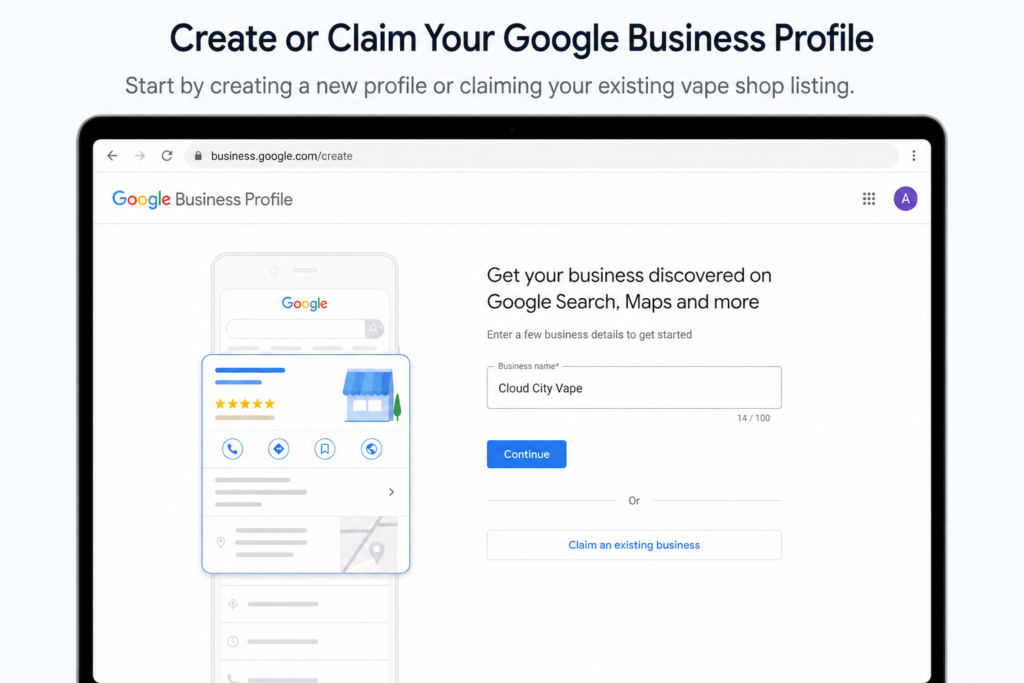
- Search Google to check if a listing already exists for your business (sometimes created automatically) — claim it if so
- If not, create a new listing at Google Business Profile Manager
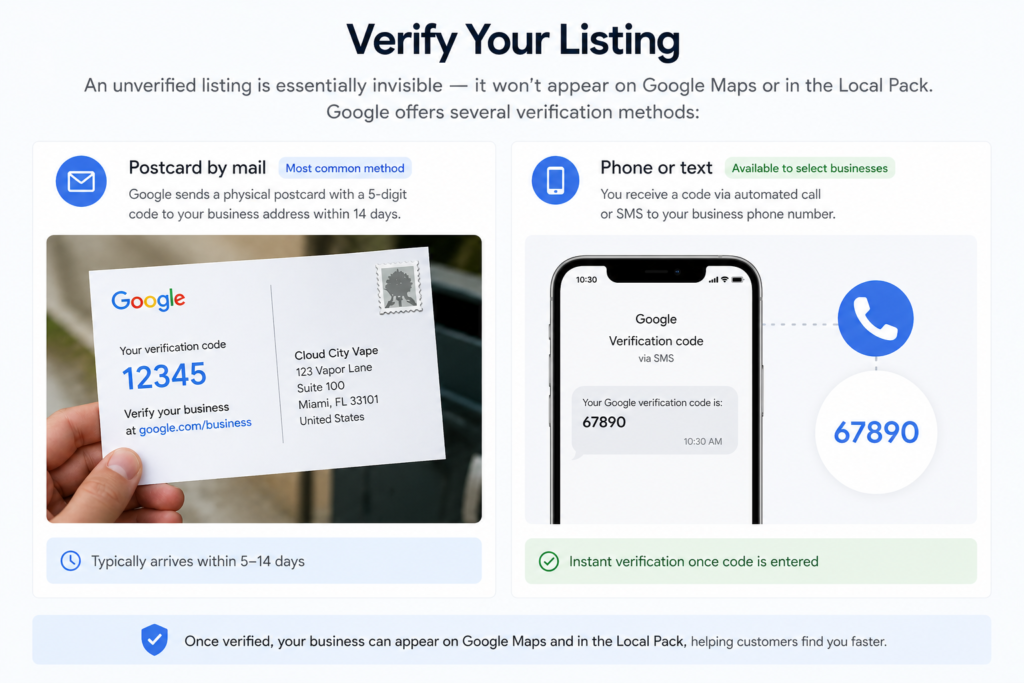
- Complete the verification process (usually via postcard, phone, or email, depending on your business type and location)
- Avoid creating duplicate listings — this can hurt your visibility and confuse Google
Step 2: Get Your Business Information Exactly Right
- Business Name: Use your exact legal/trading name — do not add keywords like "Best Vape Shop [City]" as this violates Google's guidelines and risks suspension
- Address: Must match your physical store exactly and be consistent with your website and other listings
- Phone Number: Use a local number where possible, matching what's on your website
- Website URL: Link directly to your homepage or a relevant landing page
- Business Hours: Keep these accurate and updated, including holidays and special hours
Step 3: Choose the Right Categories
- Select the most accurate primary category (e.g., "Vape Shop" or "E-cigarette Store")
- Add relevant secondary categories if applicable (e.g., "Tobacco Shop" if you also sell related products)
- Avoid selecting unrelated categories just to appear in more searches — this can violate guidelines and hurt relevance signals
Step 4: Understand Google's Restricted Content Policies for GMB
Because vape products fall under regulated/restricted categories, keep these points in mind:
- Avoid using promotional or discount-focused language directly in your business name or description that could flag the listing
- Product-specific posts (like flavor promotions) may face more scrutiny than general brand or store updates
- Photos should focus on your storefront, interior, and general shopping experience rather than close-up product/flavor promotion where restricted
- Stay updated on regional differences — GMB policies for regulated products can vary based on your Google account's country/region settings
Following these carefully reduces the risk of listing suspension, which can be difficult and time-consuming to resolve.
Step 5: Write a Strong, Compliant Business Description
- Clearly describe what your shop offers in a factual, non-promotional tone
- Mention your store's specialties (e.g., wide product range, knowledgeable staff, in-store consultation) without discount/sale language
- Include your area/city naturally for local relevance
Step 6: Add High-Quality Photos
- Storefront photos (exterior and interior)
- Team and customer service moments
- General store layout and shopping experience
- Avoid photos that focus heavily on specific product promotions if this risks violating content guidelines — general lifestyle and store-experience photos tend to be safer
Step 7: Set Up Google Business Profile Messaging & Q&A
- Enable messaging so customers can ask questions directly (age verification, product availability, store hours)
- Proactively add common Q&A entries — this reduces repetitive questions and improves the profile's usefulness
- Monitor and respond to customer-submitted questions regularly
Step 8: Manage and Respond to Reviews
- Respond to every review — positive and negative — professionally
- Encourage genuine customer reviews through compliant means (in-store signage, receipts, follow-up emails)
- Never offer incentives in exchange for reviews — this violates Google's policies and can result in listing penalties
- Address negative reviews calmly and constructively; how you respond is visible to future customers
Step 9: Post Regular Updates
- Share general store updates, new arrivals (without explicit sale language), and community involvement
- Highlight compliance-related information (age verification policy, ID requirements)
- Avoid posts that read as direct advertisements for specific products or prices, which can be flagged
Step 10: Monitor Performance and Insights
- Track how customers find your listing — direct search vs. discovery search
- Monitor calls, direction requests, and website clicks from your profile
- Use these insights to understand peak interest times and adjust store hours or staffing accordingly
- Regularly check for and correct any inaccurate information that may have been suggested by users
Common GMB Mistakes Vape Shops Make
- Keyword-stuffing the business name, risking suspension
- Inconsistent NAP (Name, Address, Phone) details across the web
- Ignoring or inconsistently responding to reviews
- Posting overtly promotional, sale-focused content that violates content guidelines
- Leaving the profile incomplete — missing hours, categories, or description
- Not monitoring for suggested edits or inaccurate information added by others
Why GMB Optimization Is a Long-Term Investment for Vape Shops
Since paid advertising is restricted for this industry, a well-optimized, policy-compliant Google Business Profile becomes one of the most valuable, sustainable assets a vape shop can build — driving consistent foot traffic and enquiries without ongoing ad spend.
Why Choose Webgeosolution for Vape Shop GMB Optimization
As a Gurugram-based SEO agency, Webgeosolution understands the specific compliance considerations vape businesses face on Google Business Profile. We handle setup, optimization, review management, and ongoing monitoring — helping your listing grow safely while maximizing local visibility.
Want your vape shop's Google Business Profile fully optimized and compliant? Get a free GMB audit from Webgeosolution.
Frequently Asked Questions (FAQs)
Q1. Can a vape shop get its Google Business Profile suspended?
Yes, if the listing violates Google's guidelines — such as keyword-stuffed business names, inaccurate information, or overtly promotional content for restricted products — it can be suspended or removed.
Q2. Can I promote discounts or offers on my vape shop's GMB profile?
Direct sale or discount language, especially tied to specific products, can risk violating Google's content policies for restricted categories — general store updates and compliant, factual information are safer.
Q3. Why is Google Business Profile so important if I can't advertise vape products on Google Ads?
GMB is a free, organic listing not subject to the same paid advertising restrictions, making it one of the most reliable ways for vape shops to appear in local search results.
Q4. How long does Google Business Profile verification take?
Verification time varies by method (postcard, phone, or email) and location, typically ranging from a few days to a couple of weeks.
Q5. Should I respond to negative reviews on my vape shop's GMB profile?
Yes, responding professionally and constructively to negative reviews shows potential customers that your business takes feedback seriously and helps maintain trust.
Q6. Can I offer incentives for customers to leave reviews?
No, offering incentives in exchange for reviews violates Google's policies and can result in penalties or removal of reviews.
Q7. Does Webgeosolution help manage ongoing GMB optimization, not just initial setup?
Yes. Webgeosolution provides ongoing GMB management, including posts, review responses, and performance monitoring, in addition to initial setup and optimization.