
 Technical SEO and schema markup for a vape e-commerce site is the set of crawl, rendering, indexation and structured-data controls that let search engines read a regulated product catalog correctly. Technical SEO decides whether Google can reach and render your pages. Schema markup decides whether Google can read the price, availability, shipping and return facts on them. This guide covers both for Shopify, WooCommerce and Magento (Adobe Commerce), from basic fixes to advanced entity-graph and merchant-policy markup, and it lists the plugins and paid apps for each platform.
Short answer. Output one Product block per product page, server-rendered, from a single source. Add brand, identifiers, shipping details and return policy. Model flavors and nicotine strengths deliberately, because Google documents only a few variant attributes. Keep every marked-up fact identical to what the shopper sees. Vape adds one more constraint: Google's Merchant Center policy keeps e-cigarettes and e-juice out of Shopping surfaces, so organic search carries more weight for you than for most retailers. Details were checked on 18 November 2026. This is not legal advice.
Why is technical SEO different for vape e-commerce?
Vape e-commerce differs because four constraints sit on top of ordinary store SEO. Each one changes how you build and mark up the catalog.
- Age gates can hide the site from crawlers. A redirect-style gate can stop Googlebot from indexing real pages. Our guide to age verification software for vape websites covers checkout-level checks that do not touch crawling.
- Paid and Shopping channels are closed. Google's Dangerous products policy lists electronic cigarettes and e-juice as products designed to simulate tobacco smoking, and Google confirmed in November 2023 that e-juice cannot appear in Shopping ads or free listings. Schema still helps product snippets and page understanding, but do not plan on Shopping-surface traffic.
- The catalog changes for legal reasons. Products leave your range when FDA authorization, state product directories or supplier status change. That makes redirect, 410 and availability handling a routine task.
- Platform risk is real. Shopify told US merchants on 24 June 2026 that it no longer supports ENDS sales, with removal due by 8 July 2026, according to TaxCloud. Many stores are now rebuilding on WooCommerce, Magento or custom stacks.

What technical SEO baseline should a vape store pass first?
| Area | Control | Vape-specific note |
|---|---|---|
| Crawl access | Server-rendered HTML for products and categories; no redirect-based age gate | Use an overlay on the rendered page and let Googlebot reach content, per Google's guidance on interstitials |
| Indexation | One canonical URL per product; faceted filters (flavor, strength, brand, bottle size) governed by a written rule | Index only the filter combinations that match real search demand, such as brand plus category |
| Rendering | Product structured data in the initial HTML | Google recommends this for Product markup, and Merchant Center structured data cannot be generated by JavaScript after load |
| Sitemaps | Separate product, category and image sitemaps with accurate lastmod | Remove discontinued products from the sitemap the day they leave the range |
| Discontinued products | 301 to the closest successor, or 410 when none exists; use schema availability Discontinued only while the page stays live | Regulatory removals are frequent, so automate the rule |
| Performance | Core Web Vitals at the 75th percentile: LCP 2.5s or less, INP 200ms or less, CLS 0.1 or less | Age-gate scripts and review widgets are common causes of layout shift |
| Internal linking | Category to product to guide links with descriptive anchors | Link regulatory and compliance guides from product templates where relevant |
Which schema types does a vape store need?
A vape store needs a connected set of types, not a single Product block. Link them with @id references so each page describes one entity graph: the organization, the site, the page, the breadcrumb and the product.
| Schema type | Where it goes | Google use | Vape note |
|---|---|---|---|
| Organization (with sameAs, logo, contactPoint) | Home page, referenced everywhere by @id | Entity understanding and knowledge panels | Use real registration and contact details; avoid health claims |
| WebSite and WebPage | Every page | Context for other nodes | Link mainEntity to the product node |
| BreadcrumbList | Category and product pages | Breadcrumb display | Mirror the visible trail exactly |
| Product and Offer | One product page per product | Product snippets and, where eligible, merchant listing experiences | Price and stock must match the page |
| ProductGroup with hasVariant | Products that vary | Variant display; added by Google in February 2024 | Documented variesBy examples are size and color, so model flavor with care |
| OfferShippingDetails and MerchantReturnPolicy | Inside Offer, or at Organization level | Shipping and return information in results | Use doesNotShip for states you cannot serve |
| AggregateRating and Review | Product pages with real, visible reviews | Review snippets | Never mark up reviews that the page does not show |
| CollectionPage and ItemList | Category pages | Page understanding | List product URLs, not full Product objects with prices |
| Article, VideoObject, FAQPage | Guides and how-to content | Article and video features; FAQ rich results ended on 7 May 2026 | FAQ markup is optional now, and Google still reads it for understanding |
Product snippets versus merchant listings
Google describes two product experiences. Product snippets show on pages about a product, including review pages. Merchant listing experiences, such as the Shopping knowledge panel and Popular Products, are for pages where shoppers can buy. Search Console reports the two separately, as Product snippets and Merchant listings. For vape, treat merchant listing eligibility as unconfirmed. Test it in the Rich Results Test and watch the Merchant listings report before you build reporting around it.
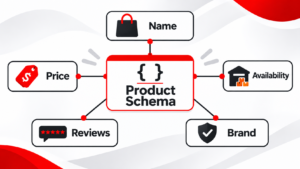
How do you write advanced Product markup for vape products?
Write one JSON-LD graph per product page. The example below uses placeholder names and shows the properties that matter most: stable @id values, brand, identifiers, vape attributes in additionalProperty, an age audience, shipping details, a state exclusion and a return policy. Replace every value with real data and validate it before release.
<script type="application/ld+json">
{
  "@context": "https://schema.org",
  "@graph": [
    {
      "@type": "Organization",
      "@id": "https://www.example-vape.com/#org",
      "name": "Example Vape Co",
      "url": "https://www.example-vape.com/",
      "logo": "https://www.example-vape.com/logo.png",
      "sameAs": ["https://www.linkedin.com/company/example-vape"]
    },
    {
      "@type": "WebPage",
      "@id": "https://www.example-vape.com/e-liquid/example-flavor/#webpage",
      "url": "https://www.example-vape.com/e-liquid/example-flavor/",
      "isPartOf": { "@id": "https://www.example-vape.com/#website" },
      "breadcrumb": { "@id": "https://www.example-vape.com/e-liquid/example-flavor/#breadcrumb" },
      "mainEntity": { "@id": "https://www.example-vape.com/e-liquid/example-flavor/#product" }
    },
    {
      "@type": "BreadcrumbList",
      "@id": "https://www.example-vape.com/e-liquid/example-flavor/#breadcrumb",
      "itemListElement": [
        { "@type": "ListItem", "position": 1, "name": "Home", "item": "https://www.example-vape.com/" },
        { "@type": "ListItem", "position": 2, "name": "E-liquid", "item": "https://www.example-vape.com/e-liquid/" },
        { "@type": "ListItem", "position": 3, "name": "Example Flavor 30ml" }
      ]
    },
    {
      "@type": "Product",
      "@id": "https://www.example-vape.com/e-liquid/example-flavor/#product",
      "name": "Example Flavor E-Liquid 30ml",
      "description": "30ml e-liquid, 70/30 VG/PG, available in 3mg and 6mg nicotine.",
      "sku": "EX-FLAV-30-6",
      "mpn": "EX-FLAV-30-6",
      "gtin12": "012345678905",
      "image": ["https://www.example-vape.com/img/example-flavor-1200.jpg"],
      "brand": { "@type": "Brand", "name": "Example Brand" },
      "audience": { "@type": "PeopleAudience", "suggestedMinAge": 21 },
      "additionalProperty": [
        { "@type": "PropertyValue", "name": "Nicotine strength", "value": 6, "unitText": "mg/mL" },
        { "@type": "PropertyValue", "name": "VG/PG ratio", "value": "70/30" },
        { "@type": "PropertyValue", "name": "Bottle volume", "value": 30, "unitText": "mL" }
      ],
      "offers": {
        "@type": "Offer",
        "url": "https://www.example-vape.com/e-liquid/example-flavor/",
        "priceCurrency": "USD",
        "price": "19.99",
        "availability": "https://schema.org/InStock",
        "itemCondition": "https://schema.org/NewCondition",
        "seller": { "@id": "https://www.example-vape.com/#org" },
        "shippingDetails": [
          {
            "@type": "OfferShippingDetails",
            "shippingDestination": { "@type": "DefinedRegion", "addressCountry": "US" },
            "shippingRate": { "@type": "MonetaryAmount", "value": "6.95", "currency": "USD" },
            "deliveryTime": {
              "@type": "ShippingDeliveryTime",
              "handlingTime": { "@type": "QuantitativeValue", "minValue": 1, "maxValue": 2, "unitCode": "DAY" },
              "transitTime": { "@type": "QuantitativeValue", "minValue": 2, "maxValue": 5, "unitCode": "DAY" }
            }
          },
          {
            "@type": "OfferShippingDetails",
            "shippingDestination": { "@type": "DefinedRegion", "addressCountry": "US", "addressRegion": ["XX", "YY"] },
            "doesNotShip": true
          }
        ],
        "hasMerchantReturnPolicy": {
          "@type": "MerchantReturnPolicy",
          "applicableCountry": "US",
          "returnPolicyCategory": "https://schema.org/MerchantReturnFiniteReturnWindow",
          "merchantReturnDays": 14,
          "returnMethod": "https://schema.org/ReturnByMail",
          "returnFees": "https://schema.org/ReturnShippingFees"
        }
      }
    }
  ]
}
</script>
Notes on the example:
- Identifiers. Use the real GTIN, MPN and SKU from the manufacturer or feed. Google's merchant documentation requires GTIN values to have the correct length and check digit.
- additionalProperty. Nicotine strength, VG/PG ratio and volume are not dedicated Product properties. A PropertyValue list holds them in a consistent entity-attribute-value shape, which helps machine readers even where Google shows no feature for them.
- audience. PeopleAudience with suggestedMinAge is valid schema.org. Google's Merchant Center maps age ranges to apparel age groups, so treat this as semantic signal and check Search Console for warnings after release.
- doesNotShip. schema.org defines doesNotShip on OfferShippingDetails to say shipping to a destination is unavailable, and Google's shipping documentation includes it in an example. Google's examples show country-level destinations, so confirm region-level behavior in the Rich Results Test and keep the visible shipping policy as the source of truth.
- Return policy. MerchantReturnPolicy requires applicableCountry and returnPolicyCategory, and merchantReturnDays when the window is finite. If you do not accept returns on opened e-liquid, say so truthfully rather than copying a generic policy.
- Precedence. Settings entered in Search Console's shipping and returns section override website markup, as Pemavor reported in November 2025. Decide which one is authoritative and keep the other consistent.
How should you handle flavor, strength and bottle-size variants?
Google added ProductGroup support in February 2024 with three properties: hasVariant nests variants under the parent, variesBy names the properties that differ, and productGroupID carries the parent identifier. Variants can share one page or have separate URLs. Google's own examples vary by size and color, and Merchant Center's variant attributes are color, size, pattern, material, age group and gender. Flavor and nicotine strength are not on that list.
That gap leads to a practical model. Treat each flavor as its own product page with its own URL, because flavor is the search intent shoppers use. Use ProductGroup only for attributes Google documents, such as bottle size. Carry nicotine strength as a separate SKU with an additionalProperty value, or as a visible selector with matching offers. Do not label flavor as color to force a fit. Read the current Google product variants documentation before you decide, since supported values can change.
{
  "@context": "https://schema.org",
  "@type": "ProductGroup",
  "@id": "https://www.example-vape.com/e-liquid/example-flavor/#group",
  "name": "Example Flavor E-Liquid",
  "productGroupID": "EX-FLAV",
  "brand": { "@type": "Brand", "name": "Example Brand" },
  "variesBy": ["https://schema.org/size"],
  "hasVariant": [
    {
      "@type": "Product",
      "sku": "EX-FLAV-30",
      "name": "Example Flavor E-Liquid 30ml",
      "size": "30ml",
      "offers": { "@type": "Offer", "url": "https://www.example-vape.com/e-liquid/example-flavor/?size=30ml",
                  "priceCurrency": "USD", "price": "19.99", "availability": "https://schema.org/InStock" }
    },
    {
      "@type": "Product",
      "sku": "EX-FLAV-60",
      "name": "Example Flavor E-Liquid 60ml",
      "size": "60ml",
      "offers": { "@type": "Offer", "url": "https://www.example-vape.com/e-liquid/example-flavor/?size=60ml",
                  "priceCurrency": "USD", "price": "32.99", "availability": "https://schema.org/InStock" }
    }
  ]
}
How should category pages be marked up?
Mark category pages as CollectionPage with an ItemList of product URLs. Avoid placing full priced Product objects for every item on a listing page. WooCommerce already limits product data on shop and taxonomy pages through its woocommerce_structured_data_product_limit filter, which shows the platform treats this as a rule.
{
  "@context": "https://schema.org",
  "@type": "CollectionPage",
  "@id": "https://www.example-vape.com/e-liquid/#webpage",
  "url": "https://www.example-vape.com/e-liquid/",
  "name": "E-Liquid",
  "mainEntity": {
    "@type": "ItemList",
    "itemListElement": [
      { "@type": "ListItem", "position": 1, "url": "https://www.example-vape.com/e-liquid/example-flavor/" },
      { "@type": "ListItem", "position": 2, "url": "https://www.example-vape.com/e-liquid/second-flavor/" }
    ]
  }
}
Entity links, policies and content schema
- Entity linking. On guides, use
aboutandmentionswithsameAspointing to public reference pages for the concepts covered, such as the Wikipedia page for electronic cigarettes. This ties the page to a known entity without adding claims. - Organization-level policies. Google supports a store-wide ShippingService under Organization using
hasShippingService, and product-level OfferShippingDetails under Offer for exceptions. Use the store-wide form for your standard policy and the product form only where a product differs. - Article and author markup. Mark up guides with Article, a named author and a published and modified date. Keep health language hedged and tied to named sources.
- FAQ markup. Google ended FAQ rich results on 7 May 2026 but says it still uses FAQ structured data to understand pages. Keep it only for genuine questions answered on the page.
- Sale pricing. If you mark up sale prices, use priceSpecification with valid dates and follow Google's current merchant listing documentation, so expired sales do not stay in markup.
How do you implement schema on Shopify?
On Shopify, schema comes from the theme, from an app, or from both, and the main risk is duplication. One caveat comes first: Shopify no longer supports ENDS sales in the US, so this section is for stores being migrated, stores outside the US (sources disagree on whether the ban is global) and teams that must understand an inherited store.
- What the theme already does. Online Store 2.0 themes, including Dawn, call the Liquid
structured_datafilter. The filter returns Product markup, or ProductGroup when a product has variants, according to Anglera. View the page source and search forapplication/ld+jsonto see what you have. - The duplicate problem. A theme block plus an app block gives two Product entries on one page. A Shopify community thread documents the Rich Results Test showing two Product JSON-LD entries. Pick one source and disable the other.
- Metafields for vape attributes. Create metafield definitions for nicotine strength, VG/PG ratio and volume, then output them in a custom snippet.
- Shipping and returns. Search Console shows missing shippingDetails and hasMerchantReturnPolicy as non-critical issues. Add them in markup or set them in Search Console, not both with different values.
{%- comment -%} snippets/vape-product-jsonld.liquid. Render once from main-product.liquid and remove the theme's own Product block. {%- endcomment -%}
{%- assign v = product.selected_or_first_available_variant -%}
<script type="application/ld+json">
{
  "@context": "https://schema.org",
  "@type": "Product",
  "@id": {{ shop.url | append: product.url | append: '#product' | json }},
  "name": {{ product.title | json }},
  "description": {{ product.description | strip_html | truncate: 300 | json }},
  "sku": {{ v.sku | json }},
  "brand": { "@type": "Brand", "name": {{ product.vendor | json }} },
  "image": {{ product.featured_image | image_url: width: 1200 | prepend: 'https:' | json }},
  "audience": { "@type": "PeopleAudience", "suggestedMinAge": 21 },
  "additionalProperty": [
    { "@type": "PropertyValue", "name": "Nicotine strength", "value": {{ product.metafields.custom.nicotine_mg | default: 0 | json }}, "unitText": "mg/mL" },
    { "@type": "PropertyValue", "name": "VG/PG ratio", "value": {{ product.metafields.custom.vg_pg | default: '' | json }} }
  ],
  "offers": {
    "@type": "Offer",
    "url": {{ shop.url | append: product.url | json }},
    "priceCurrency": {{ cart.currency.iso_code | json }},
    "price": {{ v.price | divided_by: 100.0 | json }},
    "availability": {% if product.available %}"https://schema.org/InStock"{% else %}"https://schema.org/OutOfStock"{% endif %},
    "itemCondition": "https://schema.org/NewCondition"
  }
}
</script>
How do you implement schema on WooCommerce?
WooCommerce renders Product JSON-LD itself. Its WC_Structured_Data class outputs application/ld+json on every single product page and loops over variations to build offers. Core leaves gaps, so most stores close them with a filter or a plugin.
- Filters.
woocommerce_structured_data_productchanges the whole Product node andwoocommerce_structured_data_product_offerchanges the Offer. The code below uses both. - Brand and GTIN. Brands became part of core in WooCommerce 9.4 and are on by default from 9.6, but they do not feed the schema output, according to Anglera. Map them in a filter.
- SEO plugins. Rank Math and Yoast generate Product markup from WooCommerce data, and The SEO Framework deliberately leaves Product schema to WooCommerce. Rank Math exposes a
rank_math/json_ldfilter for edits. Whichever you use, confirm that only one product block reaches the page. - Variations. The WooCommerce Google Product Feed extension adds an expanded structured data feature for variable products, limited by default to products with up to 50 variations to protect page speed.
<?php
// functions.php of a child theme, or a small must-use plugin.
add_filter( 'woocommerce_structured_data_product', function ( $markup, $product ) {

    // Brand from the core product_brand taxonomy (core does not map it into schema output).
    $brands = wp_get_post_terms( $product->get_id(), 'product_brand', array( 'fields' => 'names' ) );
    if ( ! is_wp_error( $brands ) && ! empty( $brands ) ) {
        $markup['brand'] = array( '@type' => 'Brand', 'name' => $brands[0] );
    }

    // GTIN, only if your WooCommerce version exposes the field.
    if ( method_exists( $product, 'get_global_unique_id' ) && $product->get_global_unique_id() ) {
        $markup['gtin'] = $product->get_global_unique_id();
    }

    // Vape attributes from product attributes (pa_ taxonomies).
    $props = array();
    foreach ( array( 'pa_nicotine-strength' => 'Nicotine strength', 'pa_vg-pg' => 'VG/PG ratio', 'pa_bottle-size' => 'Bottle volume' ) as $tax => $label ) {
        $value = $product->get_attribute( $tax );
        if ( $value ) {
            $props[] = array( '@type' => 'PropertyValue', 'name' => $label, 'value' => $value );
        }
    }
    if ( $props ) {
        $markup['additionalProperty'] = $props;
    }

    $markup['audience'] = array( '@type' => 'PeopleAudience', 'suggestedMinAge' => 21 );
    return $markup;
}, 10, 2 );

add_filter( 'woocommerce_structured_data_product_offer', function ( $offer, $product ) {
    $offer['hasMerchantReturnPolicy'] = array(
        '@type'                => 'MerchantReturnPolicy',
        'applicableCountry'    => 'US',
        'returnPolicyCategory' => 'https://schema.org/MerchantReturnFiniteReturnWindow',
        'merchantReturnDays'   => 14,
        'returnMethod'         => 'https://schema.org/ReturnByMail',
        'returnFees'           => 'https://schema.org/ReturnShippingFees',
    );
    $offer['shippingDetails'] = array(
        '@type'               => 'OfferShippingDetails',
        'shippingDestination' => array( '@type' => 'DefinedRegion', 'addressCountry' => 'US' ),
        'shippingRate'        => array( '@type' => 'MonetaryAmount', 'value' => '6.95', 'currency' => 'USD' ),
    );
    return $offer;
}, 10, 2 );
How do you implement schema on Magento and Adobe Commerce?
Magento ships microdata, not JSON-LD, in its default themes. Swissup's documentation and Anglera both describe the default product output as microdata, so a JSON-LD layer must be added and the microdata removed or aligned.
- Method 1: an extension. A schema or SEO suite generates JSON-LD from catalog attributes. Check which types it emits and whether it can remove the theme's microdata.
- Method 2: a custom template. Add a layout file and a PHTML template, as below. This gives full control and no extension cost, but you own the maintenance.
- Method 3: GraphQL and headless. Headless and PWA storefronts must server-render the JSON-LD. The outeredge module exposes a structured_data field through GraphQL, and Google advises Product markup in the initial HTML.
- Configurable products. Decide whether child products become separate offers. The outeredge module has a setting for including each child simple product as an offer on configurable pages.
- Hyvä and Luma. Several modules state support for both. Confirm that theme-level microdata for breadcrumbs, reviews and offers is suppressed, or you will duplicate nodes.
<?xml version="1.0"?>
<!-- app/code/Vendor/VapeSchema/view/frontend/layout/catalog_product_view.xml -->
<page xmlns:xsi="http://www.w3.org/2001/XMLSchema-instance"
      xsi:noNamespaceSchemaLocation="urn:magento:framework:View/Layout/etc/page_configuration.xsd">
    <body>
        <referenceContainer name="head.additional">
            <block class="Magento\Catalog\Block\Product\View"
                   name="vape.product.jsonld"
                   template="Vendor_VapeSchema::product/jsonld.phtml"/>
        </referenceContainer>
    </body>
</page>
<?php
/** @var \Magento\Catalog\Block\Product\View $block */
$product = $block->getProduct();
$store = $product->getStore();
$data = [
'@context' => 'https://schema.org',
'@type' => 'Product',
'name' => $product->getName(),
'sku' => $product->getSku(),
'url' => $product->getProductUrl(),
'brand' => ['@type' => 'Brand', 'name' => (string) $product->getAttributeText('manufacturer')],
'audience' => ['@type' => 'PeopleAudience', 'suggestedMinAge' => 21],
'additionalProperty' => [[
'@type' => 'PropertyValue',
'name' => 'Nicotine strength',
'value' => (string) $product->getAttributeText('nicotine_strength'),
]],
'offers' => [
'@type' => 'Offer',
'url' => $product->getProductUrl(),
'priceCurrency' => $store->getCurrentCurrencyCode(),
'price' => number_format((float) $product->getFinalPrice(), 2, '.', ''),
'availability' => $product->isAvailable()
? 'https://schema.org/InStock'
: 'https://schema.org/OutOfStock',
],
];
?>
<script type="application/ld+json"><?= /* @noEscape */ json_encode($data, JSON_UNESCAPED_SLASHES | JSON_UNESCAPED_UNICODE | JSON_HEX_TAG) ?></script>Which plugins and paid apps add schema for each platform?
Prices below are listing or vendor figures seen on 18 November 2026. Several come from third-party roundups or a competitor's comparison page, so confirm them with the vendor.
Shopify
| App | What it does | Price reported |
|---|---|---|
| Schema Plus for SEO and JSON-LD | Adds and manages JSON-LD for products and other pages; support team advertised | $14.99 a month in one listing, "from $10.99" in another; free trial |
| Ilana's JSON-LD for SEO | Expanded schema, ongoing rich-result monitoring, structured data audit, Merchant Center compatible | Annual Pro plan $399 a year; 7-day free trial |
| TinyIMG | Image optimization with JSON-LD and IndexNow | Free, or about $14 a month (Charle Agency) |
| Smart SEO | Automated meta tags, alt text and JSON-LD, with multi-language support | Free tier; SEO Plus about $20 a month in an older roundup |
| Meetanshi Schema and SEO AI | Automated JSON-LD, built-in audit and validation | $9.99 a month |
| JSON-LD Express for SEO Schema | JSON-LD with onboarding support | $7.99 a month |
| Corevance JSON-LD SEO Schema | Removes duplicate theme JSON-LD, adds breadcrumb and video schema | From $7.99 a month |
| Yoast SEO for Shopify | Metadata and schema in one plan | $19 a month in a July 2026 guest post |
WooCommerce
| Plugin | What it does | Price reported |
|---|---|---|
| Rank Math SEO | Generates Product schema from WooCommerce data; filter for edits | Free tier; Pro about $59 a year (Redefine Web) |
| Yoast SEO with WooCommerce SEO add-on | Advanced product structured data, product content checks, variation canonicals | Sources disagree: Redefine Web gives $99 plus $79 a year, BlogVault gives $118.80 plus $178.80. Check yoast.com. |
| All in One SEO and SEOPress | Meta, sitemap and schema output | Not verified in this review |
| WPSSO Core | Complete schema and meta tags; can improve other SEO plugins' markup | Free core with a premium edition |
| Google Product Feed (WooCommerce.com) | Expanded structured data for variable products up to 50 variations | Not stated on the page reviewed. Google's Merchant Center rules affect vape. |
| Schema and Structured Data for WP | Lightweight rich-snippet plugin | Free and paid tiers; not verified |
| The SEO Framework | Metadata, breadcrumbs, Organization and WebSite schema; leaves Product schema to WooCommerce | Free tier |
Magento and Adobe Commerce
| Extension | What it does | Price reported |
|---|---|---|
| Mirasvit Advanced SEO Suite | Templates, audit, cross-linking and JSON-LD markup in one extension | $179 Open Source, $378 Adobe Commerce, per Mirasvit's own comparison page |
| Mageworx SEO Suite Ultimate | Full SEO suite with developer-friendly options | $299 Open Source, $598 Adobe Commerce, same source |
| Amasty SEO Toolkit and Google Rich Snippets | Rich snippets and SEO tooling | Lite free, Pro $399, Premium $469, same source; verify with Amasty |
| BSS SEO Extension | SEO suite; AI is a separate paid add-on | $89 Basic, $149 Pro, plus $99 for Adobe Commerce, same source |
| Toweringmedia SEO Structured Data | Server-rendered Product, Offer, breadcrumb, Organization, ItemList and FAQ JSON-LD for Hyvä and Luma | $249 on the vendor's page |
| Swissup SEO Suite and Rich Snippets | Replaces default microdata with JSON-LD | Not stated on pages reviewed |
| outeredge Structured Data for SEO | JSON-LD with attribute mapping, GraphQL field and child-offer setting | Not stated on the page reviewed |
| Apptrian Rich Snippets | JSON-LD for product, category, contact, home and CMS pages | Not stated on the page reviewed |
| angeo/module-rich-data | Open-source JSON-LD for Product, Organization, BreadcrumbList, WebSite and FAQPage | Free, MIT licensed, per its author |
Enterprise teams can also look at Schema App, which describes a Merchant Center structured data workflow. Its pricing was not published on the page reviewed. If you run a custom or headless stack, build the graph in your templating layer and keep one source of truth in the product database.

How do you validate and monitor vape schema?
- Validate syntax and eligibility. Run the Rich Results Test for Google features and the Schema Markup Validator for general schema.org correctness.
- Check the raw HTML. Fetch the page without JavaScript and confirm the JSON-LD is present. Google's Shopping crawl does not reliably handle JavaScript-generated Product markup.
- Crawl at scale. Use a crawler with custom extraction to compare price, availability and identifiers in markup against the visible page across the catalog.
- Watch Search Console. Review the Product snippets and Merchant listings reports for errors and warnings, and treat missing shippingDetails or hasMerchantReturnPolicy as non-critical items to resolve deliberately.
- Test duplicates after every app or theme update. Count Product nodes per URL. The target is one.
- Re-audit after catalog changes. Regulatory removals and new state restrictions should trigger a review of availability, shipping and exclusions.
What is the implementation order, from basic to advanced?
- Basic. Remove duplicate schema, confirm one server-rendered Product block, fix price and availability, and add breadcrumbs.
- Intermediate. Add brand, GTIN, MPN and images; add Organization with sameAs; add shipping details and a return policy that match your real policies.
- Advanced. Build the @id entity graph, model sizes with ProductGroup, mark vape attributes with additionalProperty, add state exclusions with doesNotShip, and use CollectionPage and ItemList on categories.
- Governance. Automate validation in your deployment pipeline, monitor Search Console, and review markup whenever the catalog or policies change.
Frequently asked questions
Can vape products get Google Shopping listings? Google's Dangerous products policy lists electronic cigarettes and e-juice among products designed to simulate tobacco smoking, and Google confirmed in November 2023 that e-juice is not allowed in Shopping ads or free listings. Organic search and product snippets are the realistic surfaces.
Does schema improve rankings? Structured data helps search engines interpret a page. It does not guarantee rich results or higher rankings. Accuracy and consistency with the visible page are what protect eligibility.
Should I keep FAQ schema? You may keep it. Google stopped showing FAQ rich results on 7 May 2026 and says removal is not required, so keep it only where the page genuinely answers the questions.
Plugin or custom code? A plugin is faster to deploy. Custom code gives control over vape attributes and state exclusions. Either way, publish a single Product block per page.
Does the age gate affect schema? It can. If a gate stops Googlebot from rendering the page, no markup is read. Build the gate as an overlay that does not change the URL or block content.
Schema and crawl fixes pay off when the whole site is built around them. Our vape SEO services cover the entity graph, catalog crawl controls and monitoring, and our work on vape store website ranking shows how they connect to category and content strategy.
Meet Vaibhav Sharma, the visionary owner of Webgeosolution, a cutting-edge AI agency at the forefront of technological innovation. Hailing from the vibrant state of Haryana, Vaibhav's journey into the world of artificial intelligence is nothing short of inspiring. Armed with a Bachelor's degree in Information Technology, Vaibhav embarked on a quest to marry his passion for technology with a desire to push the boundaries of what's possible. His entrepreneurial spirit led him to establish Webgeosolution, where he weaves the magic of artificial intelligence into practical solutions for businesses.
About us and this blog
We are a digital marketing company with a focus on helping our customers achieve great results across several key areas.
Request a free quote
We offer professional SEO services that help websites increase their organic search score drastically in order to compete for the highest rankings even when it comes to highly competitive keywords.
Subscribe to our newsletter!
More from our blog
See all posts





Recent Posts
- Vape Brand Product Launch Marketing November 18, 2026
- Technical SEO & Schema Markup for Vape E-commerce Sites November 18, 2026
- High-Risk Payment Processing for Vape Stores (Compared) November 18, 2026